Bring your favorite agent
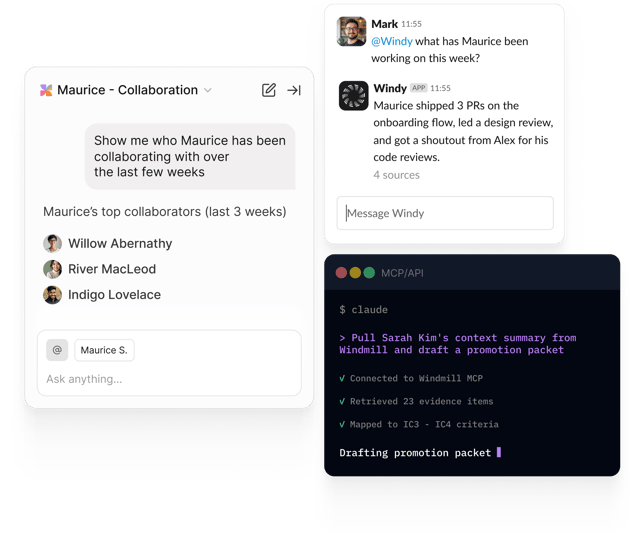
Windmill works natively in our platform, inside Slack, and inside Claude, Cursor, and hundreds of other AI agents via our MCP server.
First 10 users free, forever
Windy in Slack
Your AI teammate, right in Slack
- Prompts the right people for feedback at the right time, based on who's actually collaborating
- Pulls weekly recaps from your work tools so nothing gets forgotten by review time
- Runs the entire review cycle (collection, reminders, drafts) with zero nagging from HR

Hey @Mark, I noticed you've been working with @Tim on the new design. How's that going? Is there anything Tim could be doing better?

Tim is the 🐐
Love to hear that Tim is the greatest! Do you have any specific examples I can pass along?
Yes his designs are just so good. He always thinks through all the edge cases and when I have feedback he is super quick to respond.
Super helpful! Since this is so positive I'd recommend you share it publicly as a #shoutout
Sure do it!
MCP server
Bring Windmill wherever AI works
- Open standard. Works with Claude, Cursor, Codex, and any MCP-compatible agent.
- Permissions carry through. OAuth uses your existing Windmill account, so no one sees more than they should.
- Read and write. Query data, give feedback, schedule 1:1s, and send shoutouts on your behalf.
How it works
Connect in minutes
Add Windmill to your agent
Paste our MCP URL into your agent's connector settings, or install the Windmill plugin in Claude Code.
Sign in with Windmill
OAuth uses your existing Windmill account. Every action respects the same permissions you have in the platform.
Ask anything
Query 1:1s, pulse data, performance reviews, recaps, org charts, and feedback in natural language.
Windmill, wherever AI works
Already a Windmill customer? Add the MCP in minutes. Not yet? Get started for free.